

Selecting a web automation framework in 2026 is a strategic decision that impacts team velocity, budget, and long-term project success. Evaluating architecture, performance, and Total Cost of Ownership (TCO) helps identify the right fit.
Comparison of Architectures
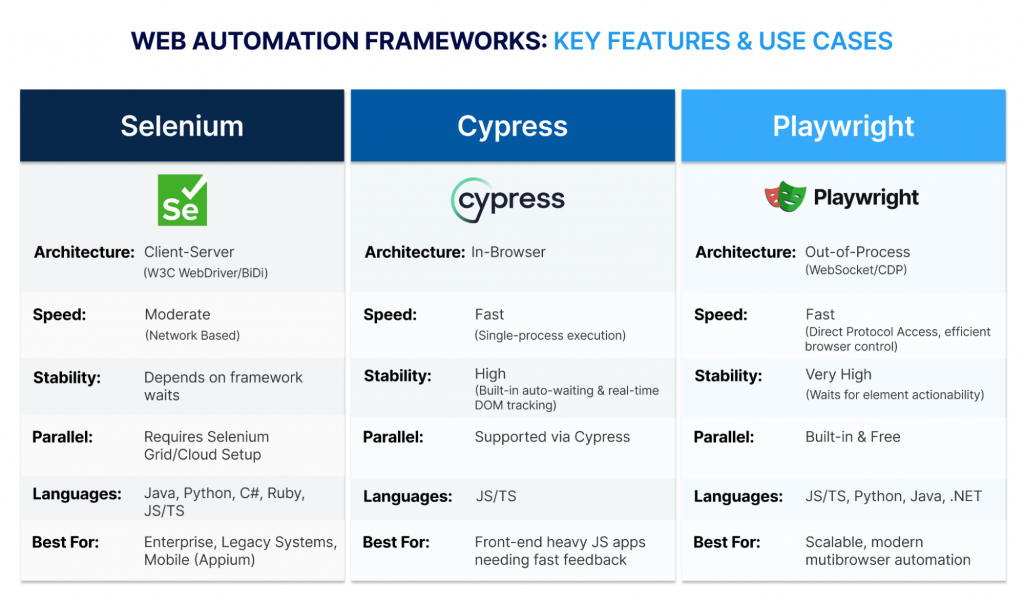
The architectural approach fundamentally determines a framework’s speed, stability, and versatility.
Performance Overview
This section provides a detailed account of each tool’s core capabilities, highlighting why one might be chosen over the others based on project requirements, from enterprise-scale, cross-language needs (Selenium) to front-end heavy JS apps (Cypress), and scalable, modern, multi-browser automation (Playwright).
| Feature | Selenium (The W3C Standard | Cypress (The Developer Workflow) | Playwright (The Cross-Engine Scaler) |
|---|---|---|---|
| Architecture | Client–Server (W3C WebDriver / BiDi Protocol) | In-Browser (Runs inside JS sandbox with direct DOM access) | Out-of-Process (WebSocket/CDP control across browsers) |
| Average Test Speed | Moderate – network-based control introduces latency | Fast – single-process execution, minimal round-trips | Fast – Direct protocol access, efficient browser control |
| Test Stability | Depends on framework waits (e.g., FluentWait, WebDriverIO) | High – Built-in auto-waiting and real-time DOM tracking | Very High – Waits for element actionability and network readiness |
| Parallel Testing | Requires Selenium Grid or cloud setup | Supported via Cypress Cloud (or custom setup) | Built-in and free with Playwright Test |
| Cross-Browser Support | Widest – All major and legacy browsers | Limited – Chromium, Edge, and Firefox. Experimental – WebKit (Safari) |
Broad – Chromium, Firefox, and WebKit (Safari) |
| API & Network Mocking | External libraries needed (e.g., REST-assured, Axios) | Built-in network stubbing with cy.intercept() | Built-in API client and advanced request interception |
| Component Testing | No native support – third-party tools required | Native integration with React, Vue, and Angular | Native support via Playwright Test |
| Languages Supported | Java, Python, C#, Ruby, JS/TS, more | JavaScript, TypeScript | JS/TS, Python, Java, .NET |
| Best For | Enterprise-scale, cross-language, legacy, or mobile testing | Front-end heavy JS apps needing fast feedback | Scalable, modern, multi-browser automation |
| Traceability | Manual audit trails | Manual cross-checks against FDA/EMA rules | Automated, explainable logs for every decision |
| Total Cost (TCO) | Variable – low license cost, higher infra setup | Low – Low upfront cost, but scaling requires developer effort or paid cloud orchestration for faster pipelines | Moderate – Free scaling, slightly higher learning curve |
Evaluation Criteria
We evaluate the tools based on the following aspects:
Speed, Stability, and Developer Sanity
Performance involves more than just raw speed; it involves consistency, resiliency, and a streamlined debugging process.
Fixing Flakiness and Debugging Issues
Flaky tests, those that pass intermittently, are one of the biggest factors reducing QA productivity.
- Selenium (Modern WebDriver): Earlier versions relied heavily on manually coded waits to synchronize with dynamic web pages, often causing instability. Modern Selenium (v4+) now integrates with the Chrome DevTools Protocol (CDP) and offers features like Relative Locators, giving testers more control and improving reliability.
- Cypress (Interactive Auto-Waiting): Cypress automatically waits for elements to appear, update, or finish animating before interacting. Its interactive Test Runner allows developers to time-travel through test commands and inspect the DOM at any step, which is ideal for quick local debugging.
- Playwright (Actionability & Observability): Playwright adds another layer of stability by checking that elements are fully actionable, including visible, enabled, stable, and unobstructed, before any interaction. For debugging, its Trace Viewer captures every step of a run, such as DOM snapshots, network logs, and console output—into a portable trace file, making post-failure analysis in CI/CD environments seamless.
Reaching Your Entire Audience: Cross-Browser and Mobile
Your tests are only as good as the environments they support. Modern web apps require coverage across three major rendering engines: Blink (Chrome, Edge), Gecko (Firefox), and WebKit (Safari).
True Cross-Browser Testing
- Playwright (Cross-Engine API): Provides a single, stable API for Chromium, Firefox, and WebKit out of the box, with seamless, reliable cross-browser execution.
- Cypress (JS Environment): Supports Chromium and Firefox natively. Experimental WebKit support exists via Playwright’s engine, but requires explicit configuration or external services like BrowserStack or LambdaTest for consistent Safari testing.
- Selenium (Universal Standard): Supports the widest array of browsers, including legacy and niche engines. Modern Selenium (v4+) simplifies driver management with Selenium Manager, reducing maintenance overhead.
Mobile Strategy: Web Emulation vs Native Apps
Mobile Web (Responsive Sites)
- Playwright offers the most advanced device emulation features, providing advanced device emulation, including viewports, touch events, permissions, and geolocation.
- Cypress offers basic viewport emulation, though advanced touch simulation requires plugins.
Native Mobile Apps (iOS/Android)
- Selenium + Appium remains the industry standard.
- Playwright and Cypress cannot automate native mobile apps.
The Bottom Line: Scaling and Total Cost of Ownership (TCO)
As test suites grow, parallel execution becomes essential to maintain fast CI/CD feedback. This is where frameworks diverge most in cost and scalability.
- Playwright – Free Parallelism, Built-In: Playwright was designed for modern pipelines. It supports native worker distribution and test sharding out of the box, requiring no paid add-ons, offering the lowest TCO for scaling.
- Cypress – Free Options, Paid Optimization: The open-source Cypress runner executes tests in a single thread. Basic parallelization can be achieved using community plugins or CI matrix logic, but intelligent time-based balancing and rich analytics are exclusive to the paid Cypress Cloud service.
- Selenium – Scalable but Infrastructure-Heavy: Selenium achieves parallel execution through a Selenium Grid or third-party cloud providers. While powerful and flexible, it introduces infrastructure setup and maintenance costs that raise total ownership overhead.
Which One is Right for You?
Prefer Selenium if:
- You require native mobile apps: You must automate native mobile applications (iOS/Android), requiring integration with Appium (the sole industry standard).
- You need maximum browser breadth: Your audience requires testing on legacy or niche browser versions that modern tools do not support.
- Your language stack is broad: You need to write tests in languages like Ruby or PHP that Playwright does not officially support.
- You have existing infra investment: You already operate or prefer to manage your parallel execution infrastructure (Selenium Grid).
Takeaway: It offers broad language support (including Java, Python, C#, and Ruby) and wide browser coverage, even though its standardized remote control method (WebDriver) historically meant dealing with some latency.
Select Cypress if:
- Developer velocity is your focus: You prioritize the fastest initial setup, simplest test syntax, and a real-time local debugging experience (time-travel debugging).
- Your team is strictly JS/TS: Your automation stack is entirely committed to the JavaScript/TypeScript ecosystem.
- You specialize in front-end: You need native, tight integration for component testing (React, Vue, Angular) alongside end-to-end testing.
- Cross-browser testing is secondary: You primarily focus on Chromium and Firefox, and are comfortable utilizing the experimental support for WebKit/Safari as a progressive, non-critical validation step.
Takeaway: Cypress provides a fast, inside-the-browser experience that’s perfect for interactive debugging, but it is limited to JavaScript/TypeScript and requires workarounds for multi-tab or cross-origin scenarios.
Go with Playwright if:
- You need guaranteed cross-engine support: You must test reliably on Chromium, Firefox, and Safari (WebKit) using a single API.
- Parallel speed is your top priority: You need to scale test running in CI/CD efficiently without paying a recurring SaaS subscription for load balancing.
- Your team uses mixed languages: You need core features (like the Trace Viewer) to work across JavaScript, Python, Java, and C# bindings with feature parity.
- Your app involves complex workflows: You frequently test multi-tab, multi-origin, or complex user state management.
- You require advanced control: You need the most robust, built-in features for device emulation, geolocation, and network interception/mocking.
Takeaway: Playwright is the modern solution designed for stability, utilizing a persistent WebSocket for direct, low-latency control that effortlessly handles complex multi-context workflows across multiple languages.
Final Thoughts
The best framework depends on project constraints, team expertise, and scalability needs. Playwright offers feature parity across all supported languages, combining speed, stability, parallelism, and observability. Cypress excels in local developer experience, while Selenium remains indispensable for legacy systems and native mobile app coverage. Each tool has its strengths, but your selection should align with the specific technical and organizational priorities of your project.
This article was supported by AI-based research and writing, with Claude 4.5 assisting in the creation of text and images.
Author

Co-author

Which is better in 2026: Selenium, Cypress, or Playwright?
There is no single best tool for every team.
- Selenium is a strong choice for enterprise-scale testing, legacy browser support, and native mobile testing with Appium.
- Cypress works well for JavaScript-heavy front-end teams that want fast setup and easy debugging.
- Playwright is often the best fit for teams that need modern, scalable, multi-browser automation with strong built-in capabilities.
Why are many teams choosing Playwright for test automation?
Many teams choose Playwright because it offers fast execution, built-in parallel testing, and strong cross-browser support across Chromium, Firefox, and WebKit. It includes advanced features such as trace viewing, network interception, and device emulation. It also reduces reliance on external paid orchestration tools for most use cases, making it efficient for modern CI/CD pipelines.
Is Cypress still a good option for web testing?
Yes, Cypress remains a strong option, especially for front-end teams working with JavaScript or TypeScript. It is popular due to its simple setup, ease of use, and excellent local debugging experience. It is best suited for fast developer feedback cycles, though it has limitations with multi-tab workflows, cross-origin scenarios, and full Safari/WebKit support.
When should you choose Selenium over Playwright or Cypress?
Selenium is the right choice when you need maximum browser coverage, including older or niche browsers, or when working with multiple programming languages such as Java, C#, or Python. It is also preferred when your test strategy includes native mobile automation using Appium. For organizations with existing Selenium Grid infrastructure and mature automation frameworks, it remains a practical long-term solution.
Which test automation framework is best for cross-browser testing?
For most modern teams, Playwright is one of the strongest options because it supports Chromium, Firefox, and WebKit through a single API. Selenium also provides excellent browser coverage, especially when legacy browser support is required. Cypress supports Chromium and Firefox well, but WebKit and Safari support are still less straightforward. Note that Playwright’s WebKit support approximates Safari but may not fully replicate all Safari-specific behaviors.
What is the most cost-effective test automation tool for scaling in CI/CD?
Playwright is often considered cost-effective because it includes built-in parallelism and test sharding without requiring a paid orchestration layer. However, the total cost depends on infrastructure, CI/CD setup, and team expertise. Selenium and Cypress can also be cost-efficient depending on how they are implemented, especially when leveraging existing infrastructure or open-source capabilities.
Which automation tool should beginners or growing QA teams start with?
The best choice depends on the team’s skills and goals.
- Cypress is ideal for teams focused on JavaScript and quick onboarding with a smooth developer experience.
- Playwright is a strong starting point for teams looking for a modern, future-ready framework with broad browser support and advanced features.
- Selenium is better suited for teams requiring enterprise flexibility, multi-language support, or mobile testing capabilities.