

Introduction
In today’s digital-first world, the ability to tap into the real-time pulse of social media is a business superpower. To achieve this, companies need to process a constant stream of unstructured content to track brand sentiment, measure campaign impact, and get ahead of emerging trends.
However, the challenge isn’t just getting the data. More importantly, it lies in building a system that can handle the volume and velocity without breaking the bank or requiring a dedicated operations team.
In this post, we explain how to build a scalable, cost-efficient, and serverless data pipeline on AWS to ingest, process, and visualize social media data. Ultimately, this architecture is designed to turn chaotic social chatter into clear, actionable insights.
The Goal : Real-Time Social Media Intelligence
To begin with, our objective is to create a fully automated system that can:
- Track Brand Health: Instantly see what customers and critics are saying about your brand across platforms like Twitter, Facebook, and Reddit.
- Identify Emerging Trends: Detect spikes in conversations or popular hashtags to spot opportunities and mitigate potential crises early.
- Analyze Marketing Campaigns: Go beyond vanity metrics and measure the real-world conversation and sentiment driven by your marketing efforts.
- Monitor the Competition: Keep a close watch on your competitors’ social media strategies and customer interactions.
- Enable Data-Driven Decisions: Replace guesswork with a live feed of market intelligence to guide your business strategy.
Overall, this pipeline is engineered to be hands-off, automatically scaling to handle massive data volumes cost-effectively.
Architecture Overview
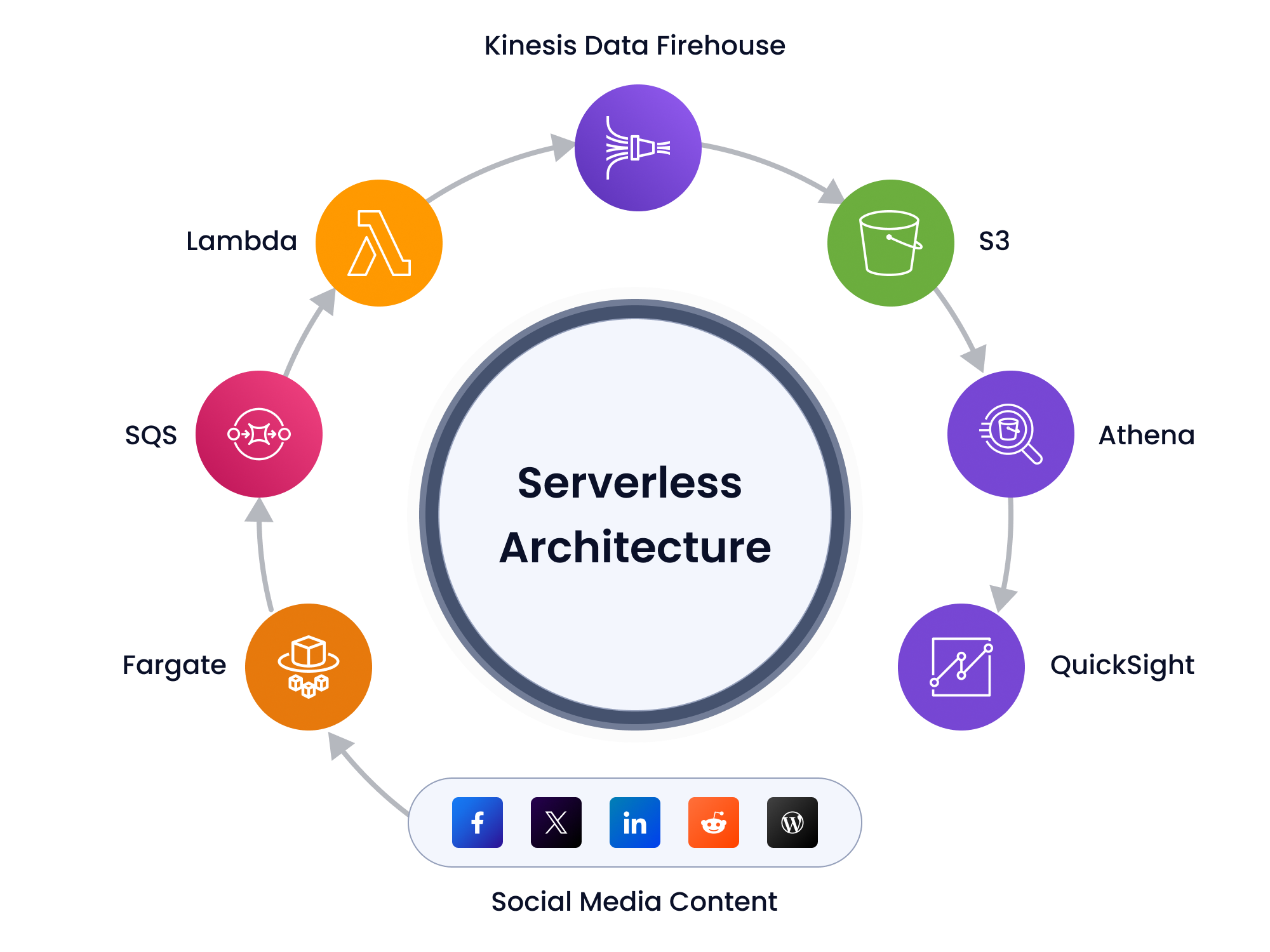
At a high level, the architecture leverages multiple AWS services, each playing a specific role:
| Layer | Services Used | Function |
|---|---|---|
| Data Ingestion | AWS Fargate, Amazon SQS | Fetch and queue social media content in real-time |
| Streaming & Transformation | AWS Lambda, Amazon Kinesis Data Firehose | Clean, enrich, and stream data to persistent storage |
| Storage | Amazon S3 | Act as a secure, partitioned data lake |
| Query & Analytics | AWS Glue, Amazon Athena | Enable ad-hoc and scheduled querying |
| Visualization | Amazon QuickSight | Present dashboards for key metrics and trends |
Building the Pipeline – Step by Step
Let’s walk through how these services work together to bring our data pipeline to life.
- Fetching Social Media Data
- First, use social media APIs (e.g., Twitter, Instagram) with access tokens for continuous data collection.
- Then, implement retry logic and robust error handling in ingestion scripts.
- Containerize fetchers using Docker and deploy to AWS Fargate.
- Then, schedule fetcher tasks using Amazon EventBridge.
- Buffering with Amazon SQS
- Next, use Amazon SQS as a decoupling mechanism between ingestion and processing.
- Furthermore, configure dead-letter queues (DLQs) to capture and isolate failed messages.
- Enable server-side encryption (SSE) and monitor queue health using CloudWatch metrics like ApproximateNumberOfMessagesDelayed.
- Data Processing and Streaming
- Use AWS Lambda to parse JSON responses, clean text, and extract entities (e.g., hashtags, mentions).
- At the same time, secure Lambda functions with least-privilege IAM roles.
- Deliver processed data to Amazon Kinesis Data Firehose for buffering and delivery.
- Enable logging and failure notifications in Firehose for troubleshooting.
- Scalable Storage with Amazon S3
- Structure the data lake using logical prefixes for efficient partitioning:
s3://social-data/twitter/year=2025/month=07/day=17/ - Moreover, enable versioning, encryption with AWS KMS, and apply lifecycle policies for archival and cost optimization.
- Querying with Athena and Glue
- Catalog incoming data with AWS Glue, defining external tables with partitioning.
- Store data in columnar format (e.g., Apache Parquet) to reduce query costs.
- As a result, use partition projection to speed up query performance.
- Finally, schedule recurring queries with EventBridge and export results to S3 for downstream consumption.
- Visualization with Amazon QuickSight
- Connect QuickSight to Athena datasets and configure periodic data refreshes.
- Build interactive dashboards to visualize:
- Post volume trends
- Hashtag frequency
- Sentiment distribution
- Additionally, implement row-level security to control access based on user roles.
- You can also share dashboards via embedded links or scheduled email reports.
Deployment Steps
- Set Permissions & Queues: Create necessary IAM roles and SQS queues, including dead-letter queues for error handling.
- Deploy Ingestion Services: Launch the data fetcher on AWS Fargate, then configure AWS Lambda and Kinesis Firehose to process and deliver the data stream.
- Configure Storage & Catalog: Create an S3 bucket with lifecycle policies, then use AWS Glue to crawl the data and create a queryable catalog.
- Validate & Visualize: Test queries with Amazon Athena to ensure data integrity, then connect to Amazon QuickSight to build dashboards.
- Automate Everything: Finally, use AWS CloudFormation or Terraform to automate this entire infrastructure for quick and reliable deployments.
Monitoring and Logging
A production-ready pipeline requires robust monitoring:
- AWS CloudWatch: Use CloudWatch Logs for all Lambda functions and Kinesis Data Firehose delivery streams. In addition, set up CloudWatch Alarms to get notified about SQS queue depth increases, Lambda execution errors, or Firehose delivery failures.
- AWS X-Ray: For complex processing logic, use X-Ray to trace requests as they travel through Lambda and other services, making it easy to pinpoint bottlenecks.
Future Enhancements
This architecture is a powerful foundation, but it’s also designed for extensibility. Here are a few ways to enhance it:
Sentiment Enrichment with Amazon Comprehend: Enhance analytics with sentiment detection, entity recognition, and key phrase extraction directly in Lambda using Amazon Comprehend.
Real-Time Alerts: Trigger anomaly alerts (e.g., spikes in negative sentiment) using Amazon SNS integrated with Slack, email, or incident response tools.
Advanced Analytics with Amazon Redshift: Migrate enriched datasets from S3 to Redshift using AWS Glue for advanced joins and historical trend analysis.
ML-Driven Insights: Integrate Amazon SageMaker to train and deploy models for:
- Influencer detection
- Topic clustering
- Fake news classification
These models can be invoked in real-time by the Lambda function during processing.
Conclusion
In summary, this serverless AWS pipeline delivers an efficient, scalable solution for ingesting and analyzing social media data in real time. By leveraging AWS managed services, it minimizes operational complexity while enabling rich insights and proactive decision-making.
Whether you’re monitoring brand sentiment, assessing marketing impact, or exploring predictive analytics, this architecture offers a robust foundation that scales with your business needs, ready for future enhancements in AI, alerting, and advanced analytics.
Author’s Note: This article was supported by AI-based research and writing, with Claude 4.5 assisting in the creation of text and images.
Author

What is a serverless social media pipeline on AWS?
A serverless social media ingestion and analytics pipeline on AWS is a fully automated, no-server system that collects real-time posts from platforms like X (Twitter), Instagram, Facebook, and Reddit. It cleans data, stores it securely, and delivers dashboards for real-time social media sentiment analysis, brand tracking, and trend spotting using AWS Lambda, Kinesis, Athena, and QuickSight.
How does AWS help with real-time social media data ingestion?
AWS supports real-time social media data ingestion by combining event-driven and managed services. For example, AWS Fargate can run API-based collectors, Amazon SQS can buffer incoming messages, and AWS Lambda can process the data as it arrives. This design helps handle high-volume social media streams more reliably.
How can this AWS pipeline support brand sentiment analysis?
This pipeline supports brand sentiment analysis by collecting social media posts, cleaning the text, extracting entities such as hashtags and mentions, and storing the processed data for analysis. It can also be extended with Amazon Comprehend to add sentiment detection, entity recognition, and key phrase extraction for deeper social media insights.
Why should businesses use AWS for social media analytics?
AWS helps businesses build a scalable, cost-efficient, and flexible social media analytics pipeline. It supports real-time data ingestion, automated processing, secure storage, and interactive dashboards.
Is data secure and private in this serverless AWS social media ingestion pipeline?
Yes, fully encrypted at rest and in transit, stored in private S3 buckets with KMS, and protected by least-privilege IAM roles. You control dashboard access. Compliant and secure for businesses handling sensitive brand or customer data in India.
Can this pipeline handle millions of social media posts per day on AWS?
Yes, AWS Lambda, Kinesis, and Athena auto-scale effortlessly to any volume. Built for high-velocity streams, it’s ideal for large-scale social media analytics AWS serverless without manual provisioning.
How do I start building a social media data pipeline on AWS quickly?
- Sign up for a free AWS account (use AWS Mumbai region for best latency in India).
- Deploy the CloudFormation template (one click).
- Add social media API keys.
- Connect QuickSight for dashboards. A working serverless social media pipeline AWS is ready in under 30 minutes.
How do Amazon Athena and AWS Glue improve social media analytics?
AWS Glue helps catalog and organize incoming social media data, while Amazon Athena makes it easy to query that data directly from Amazon S3. This helps teams run ad hoc analysis, scheduled reporting, and trend analysis without moving data into a separate database first.